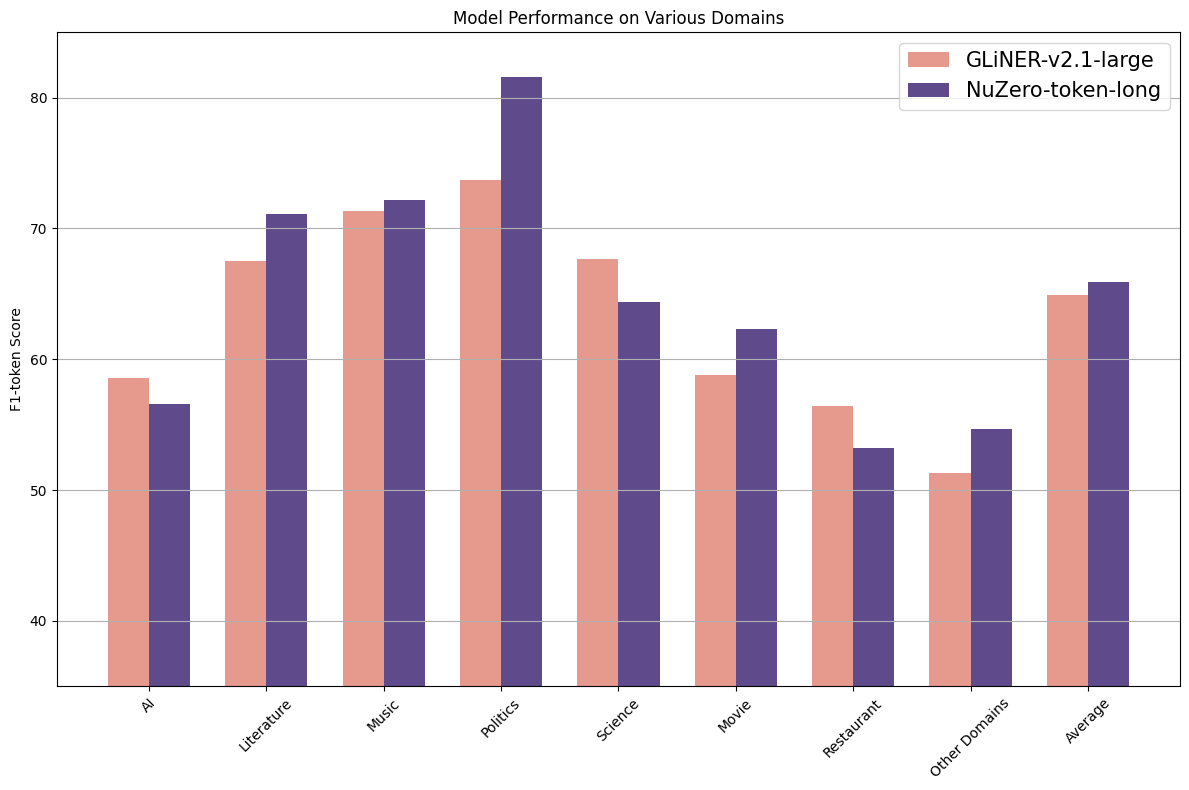
How to use numind/NuNER_Zero-4k with GLiNER:
from gliner import GLiNER

model = GLiNER.from_pretrained("numind/NuNER_Zero-4k")

text = "Cristiano Ronaldo dos Santos Aveiro was born on 5 February 1985 in Funchal, Madeira, Portugal."
labels = ["person", "date", "location"]

entities = model.predict_entities(text, labels)
for entity in entities:
    print(entity["text"], "=>", entity["label"])
https://huggingface.co/numind/NuNER_Zero-4k/resolve/main/zero_shot_performance_unzero_token_long.png
hf download hf://numind/NuNER_Zero-4k/zero_shot_performance_unzero_token_long.png
curl -L -o zero_shot_performance_unzero_token_long.png https://huggingface.co/numind/NuNER_Zero-4k/resolve/main/zero_shot_performance_unzero_token_long.png