
TRL documentation
Distributing Training
Distributing Training
Section under construction. Feel free to contribute!
Multi-GPU Training with TRL
The trainers in TRL use 🤗 Accelerate to enable distributed training across multiple GPUs or nodes. To do so, first create an 🤗 Accelerate config file by running
accelerate config
and answering the questions according to your multi-GPU / multi-node setup. You can then launch distributed training by running:
accelerate launch train.py
We also provide config files in the examples folder that can be used as templates. To use these templates, simply pass the path to the config file when launching a job, e.g.:
accelerate launch --config_file examples/accelerate_configs/multi_gpu.yaml train.py <SCRIPT_ARGS>
This automatically distributes the workload across all available GPUs.
Under the hood, 🤗 Accelerate creates one model per GPU. Each process:
- Processes its own batch of data
- Computes the loss and gradients for that batch
- Shares gradient updates across all GPUs

The effective batch size is calculated as:
To maintain a consistent batch size when scaling to multiple GPUs, make sure to update per_device_train_batch_size and gradient_accumulation_steps accordingly.
Example, these configurations are equivalent, and should yield the same results:
| Number of GPUs | Per device batch size | Gradient accumulation steps | Comments |
|---|---|---|---|
| 1 | 32 | 1 | Possibly high memory usage, but faster training |
| 1 | 4 | 8 | Lower memory usage, slower training |
| 8 | 4 | 1 | Multi-GPU to get the best of both worlds |
Having one model per GPU can lead to high memory usage, which may not be feasible for large models or low-memory GPUs. In such cases, you can leverage DeepSpeed, which provides optimizations like model sharding, Zero Redundancy Optimizer, mixed precision training, and offloading to CPU or NVMe. Check out our DeepSpeed Integration guide for more details.
Sequence Parallelism for Long Context Training
Sequence Parallelism (also called Context Parallelism) is a parallelization technique that enables training with longer sequences by splitting the sequence dimension across multiple GPUs. Each GPU processes a portion of the sequence, allowing you to train with sequences longer than what would fit on a single GPU’s memory.
Terminology clarification: This section describes parallelism techniques for splitting sequences to enable longer context training:
- Context Parallelism (CP): Splits sequences across GPUs (implemented as Ring Attention with FSDP2)
- Sequence Parallelism (SP): Another form of sequence splitting (implemented as ALST/Ulysses with DeepSpeed)
Both CP and SP are different from traditional Sequence Parallelism used with Tensor Parallelism (TP+SP) to reduce activation memory. With the techniques here, parallelism dimensions multiply:
TP=2andCP=2would require 4 GPUs (2×2), whereas traditionalTP+SP=2only needs 2 GPUs as they share the same ranks.In Accelerate’s
ParallelismConfig:
- Use
cp_sizewithcp_backend="torch"for Ring Attention (FSDP2)- Use
sp_sizewithsp_backend="deepspeed"for ALST/Ulysses (DeepSpeed)
Sequence parallelism is particularly useful when:
- You want to train with very long sequences (>32k tokens)
- Single GPU memory is insufficient for your desired sequence length
- You need to maintain sequence coherence across the full context
Available Implementations
TRL supports two sequence parallelism implementations, each with different characteristics:
- Ring Attention (FSDP2) - Uses ring-based communication for memory-efficient processing of extremely long sequences
- ALST/Ulysses (DeepSpeed) - Uses attention head parallelism for faster training with high-bandwidth interconnects
Sequence Length Terminology: When using Context Parallelism, the sequence is split across GPUs, introducing two concepts:
- Global sequence length: The full sequence length before splitting across GPUs
- Micro sequence length: The sequence length per GPU after splitting
In TRL,
max_seq_length(ormax_length) refers to the global sequence length. The framework automatically handles splitting into micro sequences:
- Ring Attention (FSDP2): Uses
cp_sizeto split sequences. Withmax_seq_length=8192andcp_size=4, each GPU processes 2048 tokens.- ALST/Ulysses (DeepSpeed): Uses
sp_size(withsp_backend="deepspeed") to split sequences. Withmax_seq_length=8192andsp_size=2, each GPU processes 4096 tokens.The Trainer automatically accounts for context parallelism when calculating batch sizes and training metrics.
Choosing Between Ring Attention and Ulysses
The comparison table below highlights the key differences between the two approaches:
| Feature | Ring Attention (FSDP2) | ALST/Ulysses (DeepSpeed) |
|---|---|---|
| Method | Ring Self-Attention | Attention Head Parallelism |
| Backend | PyTorch FSDP2 | DeepSpeed ZeRO |
| Attention | SDPA only | Flash Attention 2 or SDPA |
| Minimum Accelerate | 1.11.0+ | 1.12.0+ |
| Minimum DeepSpeed | N/A | 0.18.1+ |
| Sequence Divisibility | cp_size * 2 | sp_size |
| Zero Stage | N/A | ZeRO Stage 1/2/3 |
Ring Attention is better when:
- You need to handle extremely long sequences (1M+ tokens)
- The model has limited attention heads (Ring Attention is not constrained by head count)
- You want flexibility in scaling to any sequence length
- Network topology is limited (Ring Attention works with simple P2P ring communication)
Ulysses is better when:
- You have high-bandwidth, low-latency interconnects (NVLink, InfiniBand)
- The model has many attention heads that can be split across GPUs
- You want lower communication volume
- You want faster training speed for moderate sequence lengths (up to ~500k tokens)
Key Trade-offs:
- Communication Volume: Ulysses has lower communication volume, making it more efficient with good interconnects. Ring Attention has higher communication volume but is more flexible with different network topologies.
- Attention Head Constraints: Ulysses is limited by the number of attention heads (requires
num_heads >= sp_size). Ring Attention scales with sequence length regardless of model architecture. - Network Sensitivity: Ulysses all-to-all communication is sensitive to network latency. Ring Attention uses P2P ring communication which is more tolerant of varying network conditions.
For a detailed comparison, see the Ulysses and Ring Attention blog post.
Ring Attention Implementation (FSDP2)
Ring Attention uses a ring-like communication pattern where each GPU processes a portion of the sequence and passes information to the next GPU in the ring.
Requirements and Limitations
- Accelerate 1.11.0 or higher is required for Ring Attention / Context Parallelism support
- FSDP2 (PyTorch FSDP v2) is required as the distributed training backend
- SDPA attention - Flash Attention is currently not supported
- Sequence length divisibility - sequences must be divisible by
cp_size * 2. This is automatically handled using thepad_to_multiple_ofparameter in the data collator.
Configuration
Accelerate Configuration
Use one of the provided accelerate config files (e.g. context_parallel_2gpu.yaml for 2 GPUs):
compute_environment: LOCAL_MACHINE
debug: false
distributed_type: FSDP
downcast_bf16: 'no'
enable_cpu_affinity: false
fsdp_config:
  fsdp_activation_checkpointing: true  # Enable activation checkpointing for memory efficiency
  fsdp_auto_wrap_policy: TRANSFORMER_BASED_WRAP
  fsdp_cpu_ram_efficient_loading: true
  fsdp_offload_params: false
  fsdp_reshard_after_forward: true
  fsdp_state_dict_type: FULL_STATE_DICT
  fsdp_version: 2
machine_rank: 0
main_training_function: main
mixed_precision: bf16
num_machines: 1
num_processes: 2  # Number of GPUs
rdzv_backend: static
same_network: true
tpu_env: []
tpu_use_cluster: false
tpu_use_sudo: false
use_cpu: false
parallelism_config:
  parallelism_config_dp_replicate_size: 1
  parallelism_config_dp_shard_size: 1
  parallelism_config_tp_size: 1
  parallelism_config_cp_size: 2  # Context parallel size
Training Configuration
from trl import SFTConfig

training_args = SFTConfig(
    # required
    pad_to_multiple_of=4,           # ensures divisibility by cp_size * 2
    # to get the most out of CP
    max_length=16384,               # long sequence length
    packing=True,                   # use packing to reduce padding
    use_liger_kernel=True,          # compatible with CP
    gradient_checkpointing=False,   # The activation_checkpointing in FSDP config and the gradient_checkpointing in training arg can't be set to True simultaneously
    per_device_train_batch_size=1,
    ...
)
Then, launch your training script with the appropriate accelerate config file:
accelerate launch --config_file context_parallel_2gpu.yaml train.py
Best Practices
Use the
pad_to_multiple_ofparameter - This is now the recommended way to ensure sequence length divisibility:- For
cp_size=2: usepad_to_multiple_of=4(sincecp_size * 2 = 4) - For
cp_size=4: usepad_to_multiple_of=8(sincecp_size * 2 = 8) - The data collator automatically pads sequences to the required multiple, ensuring compatibility with CP
- For
Use packing with padding - The default BFD (Best Fit Decreasing) strategy works perfectly:
- Preserves sequence boundaries and maintains training quality
- Works seamlessly with both
padding_free=Trueand standard padding modes
Combine with other memory optimizations like Liger kernels, bfloat16, and gradient checkpointing
Start with smaller context parallel sizes (2-4 GPUs) before scaling up
Monitor memory usage across all GPUs to ensure balanced workload
Benchmarking Ring Attention
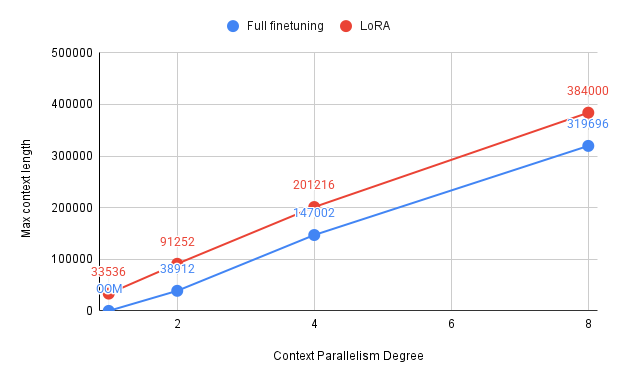
We benchmarked Ring Attention to highlight its potential improvements in training efficiency.
Our experiments were conducted using 1, 2, 4, and 8 H100 GPUs, though the results can be extended to larger clusters with more nodes and GPUs.
For the setup, we fine-tuned an 8B model (Qwen/Qwen3-8B) using the provided accelerate configuration
(context_parallel_2gpu.yaml).
We adjusted num_processes and parallelism_config_cp_size based on the number of GPUs for each run.
Training was performed with the sft.py example script, combined with the parameters described above.
The results below summarize the maximum trainable sequence length and iterations per second for different numbers of GPUs. A value marked as OOM indicates that the configuration ran out of memory and could not be trained.
These results show that Context Parallelism (CP) scales effectively with more GPUs, enabling training on much longer sequences. With 8 GPUs, context lengths of over 300k tokens become feasible, unlocking training with extremely long contexts while maintaining reasonable throughput.

Accelerate also supports N-Dimensional Parallelism (ND-parallelism), which enables you to combine different parallelization strategies to efficiently distribute model training across multiple GPUs.
You can learn more and explore configuration examples in the Accelerate ND-parallelism guide.
ALST/Ulysses Implementation (DeepSpeed)
ALST (Arctic Long Sequence Training) / Ulysses uses attention head parallelism to split long sequences across GPUs, working with DeepSpeed’s ZeRO optimizer.
Technical Note on Parallelism Configuration:
- DeepSpeed ALST/Ulysses uses
sp_sizewithsp_backend="deepspeed"in both YAML and Python API- Ring Attention (FSDP2) uses
cp_sizewithcp_backend="torch"The Trainer automatically accounts for both CP and SP when calculating effective batch sizes and training metrics.
Requirements and Limitations
- DeepSpeed 0.18.1 or higher is required
- Accelerate 1.12.0 or higher is required for ALST/Ulysses sequence parallelism support
- Attention implementation - Flash Attention 2 recommended (clean output), SDPA works as fallback
- Sequence length divisibility - sequences must be divisible by
sp_size. Usepad_to_multiple_ofin your training config. - Parallelism configuration - You must ensure
dp_replicate_size × dp_shard_size × sp_size = num_processes
Configuration
Accelerate Configuration
Use the provided accelerate config file (alst_ulysses_4gpu.yaml):
compute_environment: LOCAL_MACHINE
debug: false
deepspeed_config:
  zero_stage: 3
  seq_parallel_communication_data_type: bf16
distributed_type: DEEPSPEED
mixed_precision: bf16
num_machines: 1
num_processes: 4  # Number of GPUs
parallelism_config:
  parallelism_config_dp_replicate_size: 1
  parallelism_config_dp_shard_size: 2  # Enables 2D parallelism with SP
  parallelism_config_tp_size: 1
  parallelism_config_sp_size: 2  # Sequence parallel size
  parallelism_config_sp_backend: deepspeed
  parallelism_config_sp_seq_length_is_variable: true
  parallelism_config_sp_attn_implementation: flash_attention_2
Training Configuration
from trl import SFTConfig

training_args = SFTConfig(
    # required
    pad_to_multiple_of=2,    # Must equal sp_size
    # to get the most out of SP
    max_seq_length=4096,
    packing=True,
    gradient_checkpointing=True,
    attn_implementation="flash_attention_2",
    per_device_train_batch_size=1,
    ...
)
Then, launch your training script with the appropriate accelerate config file:
accelerate launch --config_file examples/accelerate_configs/alst_ulysses_4gpu.yaml train.py
2D Parallelism
The 4 GPU configuration above automatically enables 2D parallelism by combining Data Parallelism (DP) with Sequence Parallelism (SP). With sp_size=2 and dp_shard_size=2, the 4 GPUs are organized as:
- 2 sequence parallel groups (processing the same data split across sequences)
- 2 data parallel groups (processing different data)
To adjust the parallelism for different GPU counts, modify the YAML config:
| GPUs | sp_size | dp_shard_size | Use Case | YAML Changes |
|---|---|---|---|---|
| 4 | 2 | 2 | Balanced - longer sequences + more data | num_processes: 4, sp_size: 2, dp_shard_size: 2 |
| 4 | 4 | 1 | Pure SP for maximum sequence length | num_processes: 4, sp_size: 4, dp_shard_size: 1 |
| 8 | 2 | 4 | Large-scale training | num_processes: 8, sp_size: 2, dp_shard_size: 4 |
Best Practices
- Use
pad_to_multiple_ofto ensure sequences are divisible bysp_size - Use Flash Attention 2 for clean output (SDPA works but shows packing warnings)
- Start with
sp_size=2before scaling to larger values - Use DeepSpeed ZeRO Stage 3 for large models
- Combine with memory optimizations like Liger kernels and gradient checkpointing
- Validate parallelism config: Ensure
dp_replicate_size × dp_shard_size × sp_size = num_processes
Complete Example
Here’s how to run ALST/Ulysses training using the built-in sft.py script with 4 GPUs:
accelerate launch --config_file examples/accelerate_configs/alst_ulysses_4gpu.yaml \
    trl/scripts/sft.py \
    --model_name_or_path Qwen/Qwen2-0.5B \
    --dataset_name trl-lib/Capybara \
    --learning_rate 2e-4 \
    --max_steps 100 \
    --max_seq_length 4096 \
    --packing \
    --packing_strategy wrapped \
    --torch_dtype bfloat16 \
    --gradient_checkpointing \
    --attn_implementation flash_attention_2 \
    --output_dir output-alst-4gpu \
    --logging_steps 10 \
    --report_to trackio
This command automatically:
- Configures 2D parallelism (SP=2, DP=2) across 4 GPUs
- Uses Flash Attention 2 for clean training
- Enables packing with automatic padding to ensure sequence divisibility
- Leverages DeepSpeed ZeRO Stage 3 for memory efficiency
Further Reading
General Resources
- Hugging Face Blog: Understanding Ulysses and Ring Attention - Detailed comparison of Ring Attention vs Ulysses approaches
- Accelerate: Context Parallelism Guide
- Hugging Face Blog: Enabling Long-Context Training with Sequence Parallelism in Axolotl
Ring Attention (FSDP2)
- Ultrascale Playbook - Context Parallelism
- Accelerate Example: 128k Sequence Length
- Accelerate ND-parallelism Guide
ALST/Ulysses (DeepSpeed)
- DeepSpeed Sequence Parallelism Documentation
- Snowflake Engineering Blog: Arctic Long Sequence Training (ALST)
Multi-Node Training
We’re working on a guide for multi-node training. Stay tuned! 🚀
Update on GitHub