# TVP
## 概述
文本-视觉提示(TVP)框架由 Yimeng Zhang、Xin Chen、Jinghan Jia、Sijia Liu 和 Ke Ding 在论文 [Text-Visual Prompting for Efficient 2D Temporal Video Grounding](https://huggingface.co/papers/2303.04995) 中提出。
该论文的摘要如下:
*在本文中,我们研究了时序视频定位(TVG)问题,其目标是在长且未剪辑的视频中,预测由文本句子描述的时刻的起始/结束时间点。得益于细粒度的 3D 视觉特征,TVG 技术在近年来取得了显著进展。然而,3D 卷积神经网络(CNN)的高复杂度使得提取稠密的 3D 视觉特征耗时较长,这需要大量的内存和计算资源。为了实现高效的 TVG,我们提出了一种新颖的文本-视觉提示(TVP)框架,该框架将优化后的扰动模式(我们称之为“提示”)整合到 TVG 模型的视觉输入和文本特征中。与 3D CNN 形成鲜明对比的是,我们证明 TVP 允许我们在 2D TVG 模型中有效地协同训练视觉编码器和语言编码器,并且仅使用低复杂度的稀疏 2D 视觉特征即可提升跨模态特征融合的性能。此外,我们提出了一种时序距离 IoU(TDIoU)损失函数,用于 TVG 的高效学习。在 Charades-STA 和 ActivityNet Captions 这两个基准数据集上的实验表明,所提出的 TVP 显著提升了 2D TVG 的性能(例如,在 Charades-STA 上提升了 9.79%,在 ActivityNet Captions 上提升了 30.77%),并且与使用 3D 视觉特征的 TVG 相比,实现了 5 倍的推理加速。*
本研究针对时序视频定位(TVG)问题,即根据文本句子描述,在长视频中精确定位特定事件的起始和结束时间。我们提出了文本-视觉提示(TVP)来增强 TVG。TVP 涉及将专门设计的模式(称为“提示”)整合到 TVG 模型的视觉(基于图像)和文本(基于词语)输入组件中。这些提示提供了额外的时空上下文,从而提高了模型准确确定视频中事件时间的能力。该方法采用 2D 视觉输入来替代 3D 输入。尽管 3D 输入能提供更丰富的时空细节,但其处理耗时也更长。结合提示方法使用 2D 输入,旨在更高效地提供同等水平的上下文和准确性。
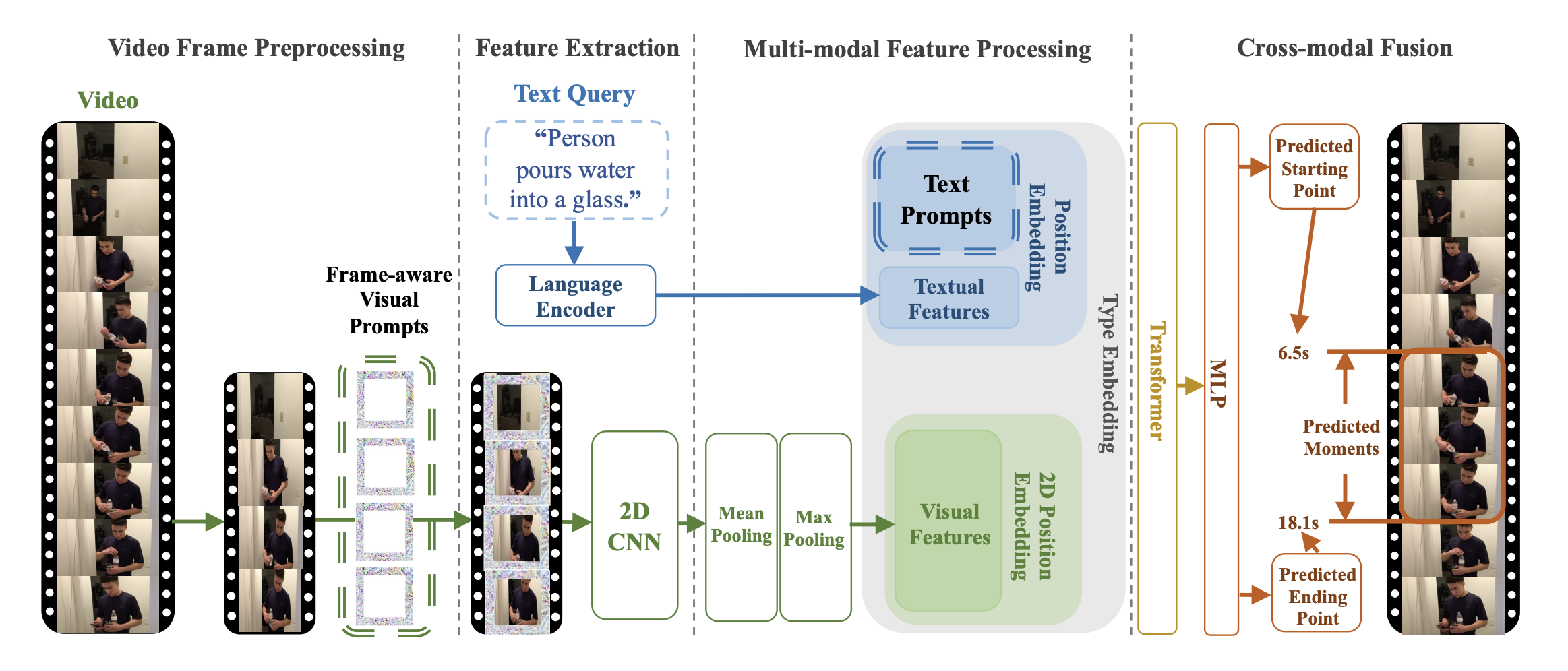 TVP 架构。摘自原始论文。
该模型由 [Jiqing Feng](https://huggingface.co/Jiqing) 贡献。原始代码可在[此处](https://github.com/intel/TVP)找到。
## 使用技巧与示例
Prompt 是一种经过优化的扰动模式,会被添加到输入的视频帧或文本特征中。通用集指的是对任何输入都使用完全相同的一组 prompt,这意味着无论输入内容如何,这些 prompt 都会一致地添加到所有视频帧和文本特征中。
TVP 由视觉编码器和跨模态编码器组成。它包含一组通用的视觉提示和文本提示,分别用于整合到采样的视频帧和文本特征中。具体而言,一组不同的视觉提示会按顺序应用于一个未剪辑视频中的均匀采样帧。
该模型的目标是将可训练提示(trainable prompts)同时融入视觉输入和文本特征中,以解决时序视频定位(TVG)问题。原则上,可以在所提出的架构中应用任意视觉编码器或跨模态编码器。
[TvpProcessor](/docs/transformers/v5.23.0/zh/model_doc/tvp#transformers.TvpProcessor) 将 [BertTokenizer](/docs/transformers/v5.23.0/zh/model_doc/lxmert#transformers.BertTokenizer) 和 [TvpImageProcessor](/docs/transformers/v5.23.0/zh/model_doc/tvp#transformers.TvpImageProcessor) 封装为单个实例,分别用于编码文本和准备图像。
以下示例展示了如何使用 [TvpProcessor](/docs/transformers/v5.23.0/zh/model_doc/tvp#transformers.TvpProcessor) 和 [TvpForVideoGrounding](/docs/transformers/v5.23.0/zh/model_doc/tvp#transformers.TvpForVideoGrounding) 运行时序视频定位。
```python
import av
import cv2
import numpy as np
from huggingface_hub import hf_hub_download
from transformers import AutoProcessor, TvpForVideoGrounding
def pyav_decode(container, sampling_rate, num_frames, clip_idx, num_clips, target_fps):
'''
Convert the video from its original fps to the target_fps and decode the video with PyAV decoder.
Args:
container (container): pyav container.
sampling_rate (int): frame sampling rate (interval between two sampled frames).
num_frames (int): number of frames to sample.
clip_idx (int): if clip_idx is -1, perform random temporal sampling.
If clip_idx is larger than -1, uniformly split the video to num_clips
clips, and select the clip_idx-th video clip.
num_clips (int): overall number of clips to uniformly sample from the given video.
target_fps (int): the input video may have different fps, convert it to
the target video fps before frame sampling.
Returns:
frames (tensor): decoded frames from the video. Return None if the no
video stream was found.
fps (float): the number of frames per second of the video.
'''
video = container.streams.video[0]
fps = float(video.average_rate)
clip_size = sampling_rate * num_frames / target_fps * fps
delta = max(num_frames - clip_size, 0)
start_idx = delta * clip_idx / num_clips
end_idx = start_idx + clip_size - 1
timebase = video.duration / num_frames
video_start_pts = int(start_idx * timebase)
video_end_pts = int(end_idx * timebase)
seek_offset = max(video_start_pts - 1024, 0)
container.seek(seek_offset, any_frame=False, backward=True, stream=video)
frames = {}
for frame in container.decode(video=0):
if frame.pts < video_start_pts:
continue
frames[frame.pts] = frame
if frame.pts > video_end_pts:
break
frames = [frames[pts] for pts in sorted(frames)]
return frames, fps
def decode(container, sampling_rate, num_frames, clip_idx, num_clips, target_fps):
'''
Decode the video and perform temporal sampling.
Args:
container (container): pyav container.
sampling_rate (int): frame sampling rate (interval between two sampled frames).
num_frames (int): number of frames to sample.
clip_idx (int): if clip_idx is -1, perform random temporal sampling.
If clip_idx is larger than -1, uniformly split the video to num_clips
clips, and select the clip_idx-th video clip.
num_clips (int): overall number of clips to uniformly sample from the given video.
target_fps (int): the input video may have different fps, convert it to
the target video fps before frame sampling.
Returns:
frames (tensor): decoded frames from the video.
'''
assert clip_idx >= -2, f"Not a valid clip_idx {clip_idx}"
frames, fps = pyav_decode(container, sampling_rate, num_frames, clip_idx, num_clips, target_fps)
clip_size = sampling_rate * num_frames / target_fps * fps
index = np.linspace(0, clip_size - 1, num_frames)
index = np.clip(index, 0, len(frames) - 1).astype(np.int64)
frames = np.array([frames[idx].to_rgb().to_ndarray() for idx in index])
frames = frames.transpose(0, 3, 1, 2)
return frames
file = hf_hub_download(repo_id="Intel/tvp_demo", filename="AK2KG.mp4", repo_type="dataset")
model = TvpForVideoGrounding.from_pretrained("Intel/tvp-base", device_map="auto")
decoder_kwargs = dict(
container=av.open(file, metadata_errors="ignore"),
sampling_rate=1,
num_frames=model.config.num_frames,
clip_idx=0,
num_clips=1,
target_fps=3,
)
raw_sampled_frms = decode(**decoder_kwargs)
text = "a person is sitting on a bed."
processor = AutoProcessor.from_pretrained("Intel/tvp-base")
model_inputs = processor(
text=[text], videos=list(raw_sampled_frms), return_tensors="pt", max_text_length=100#, size=size
)
model_inputs["pixel_values"] = model_inputs["pixel_values"].to(model.dtype)
output = model(**model_inputs)
def get_video_duration(filename):
cap = cv2.VideoCapture(filename)
if cap.isOpened():
rate = cap.get(5)
frame_num = cap.get(7)
duration = frame_num/rate
return duration
return -1
duration = get_video_duration(file)
start, end = processor.post_process_video_grounding(output.logits, duration)
print(f"The time slot of the video corresponding to the text \"{text}\" is from {start}s to {end}s")
```
提示:
- 此 TVP 实现使用 [BertTokenizer](/docs/transformers/v5.23.0/zh/model_doc/lxmert#transformers.BertTokenizer) 生成文本嵌入,并使用 Resnet-50 模型计算视觉嵌入。
- 预训练 [tvp-base](https://huggingface.co/Intel/tvp-base) 的检查点已发布。
- 请参阅 [表 2](https://huggingface.co/papers/2303.04995) 了解 TVP 在 Temporal Video Grounding 任务上的性能。
## TvpConfig[[transformers.TvpConfig]]
#### transformers.TvpConfig[[transformers.TvpConfig]]
```python
transformers.TvpConfig(transformers_version: str | None = None, architectures: list[str] | None = None, output_hidden_states: bool | None = False, return_dict: bool | None = True, dtype: str | torch.dtype | None = None, chunk_size_feed_forward: int = 0, is_encoder_decoder: bool = False, id2label: dict[int, str] | dict[str, str] | None = None, label2id: dict[str, int] | dict[str, str] | None = None, problem_type: Literal['regression', 'single_label_classification', 'multi_label_classification'] | None = None, backbone_config: dict | transformers.configuration_utils.PreTrainedConfig | None = None, distance_loss_weight: float = 1.0, duration_loss_weight: float = 0.1, visual_prompter_type: str = 'framepad', visual_prompter_apply: str = 'replace', visual_prompt_size: int = 96, max_img_size: int = 448, num_frames: int = 48, vocab_size: int = 30522, type_vocab_size: int = 2, hidden_size: int = 768, intermediate_size: int = 3072, num_hidden_layers: int = 12, num_attention_heads: int = 12, max_position_embeddings: int = 512, max_grid_col_position_embeddings: int = 100, max_grid_row_position_embeddings: int = 100, hidden_dropout_prob: float | int = 0.1, hidden_act: str = 'gelu', layer_norm_eps: float = 1e-12, initializer_range: float = 0.02, attention_probs_dropout_prob: float | int = 0.1, pad_token_id: int | None = None)
```
[来源](https://github.com/huggingface/transformers/blob/v5.23.0/src/transformers/models/tvp/configuration_tvp.py#L25)
**参数:**
backbone_config (`Union[dict, ~configuration_utils.PreTrainedConfig]`,*可选*):骨干模型的配置。
distance_loss_weight (`float`, *可选*, 默认为 1.0) : 距离损失的权重。
duration_loss_weight (`float`, *可选*, 默认值为 0.1) : 持续时间损失的权重。
visual_prompter_type (`str`, *可选*, 默认为 `"framepad"`) : 视觉提示类型。填充的类型。Framepad 表示对每一帧进行填充。应为 "framepad" 或 "framedownpad" 之一
visual_prompter_apply (`str`, *可选*, 默认为 `"replace"`) : 应用视觉提示的方式。Replace 表示使用 prompt 的值来更改视觉输入中的原始值。应为 "replace"、"add" 或 "remove" 之一。
visual_prompt_size (`int`,*可选*,默认为 96):视觉提示的大小。
max_img_size (`int`,*可选*,默认为 448):帧的最大尺寸。
num_frames (`int`,*可选*,默认为 48):从视频中提取的帧数。
vocab_size (`int`,*可选*,默认值为 `30522`):模型的词汇表大小。定义了 `input_ids` 可以表示的不同 token 数量。
type_vocab_size (`int`,*可选*,默认为 `2`):`token_type_ids` 的词汇表大小。
hidden_size (`int`,*可选*,默认为 `768`):隐藏表示的维度。
intermediate_size (`int`,*可选*,默认值为 `3072`):MLP 表示的维度。
num_hidden_layers (`int`,*可选*,默认为 `12`):Transformer 解码器中的隐藏层数。
num_attention_heads (`int`,*可选*,默认为 `12`):Transformer 解码器中每个注意力层的注意力头数量。
max_position_embeddings (`int`, *可选*,默认为 512):该模型可能使用的最大序列长度。通常建议将其设置为一个较大的值以防万一(例如 512、1024 或 2048)。
max_grid_col_position_embeddings (`int`,*可选*,默认为 100):视频帧中水平方向的最大 patch 数量。
max_grid_row_position_embeddings (`int`,*可选*,默认为 100):视频帧中垂直方向的最大 patch 数量。
hidden_dropout_prob (`Union[float, int]`,*可选*,默认值为 `0.1`):嵌入层、编码器和池化器中所有全连接层的 dropout 概率。
hidden_act (`str`,*可选*,默认为 `gelu`):解码器中的非线性激活函数(函数或字符串)。例如,`"gelu"`、`"relu"`、`"silu"` 等。
layer_norm_eps (`float`, *可选*,默认为 `1e-12`):层归一化层所使用的 epsilon。
initializer_range (`float`,*可选*,默认值为 `0.02`):用于初始化所有权重矩阵的 truncated_normal_initializer 的标准差。
attention_probs_dropout_prob (`Union[float, int]`,*可选*,默认值为 `0.1`):注意力概率的 dropout 比率。
pad_token_id (`int`, *可选*) : 词表中用于填充的 Token id。
这是用于存储 TvpModel 配置的类。它根据指定的参数实例化 Tvp 模型,并定义模型架构。使用默认值实例化配置将生成与 [Intel/tvp-base](https://huggingface.co/Intel/tvp-base) 类似的配置。
配置对象继承自 [PreTrainedConfig](/docs/transformers/v5.23.0/zh/main_classes/configuration#transformers.PreTrainedConfig),可用于控制模型输出。有关更多信息,请参阅 [PreTrainedConfig](/docs/transformers/v5.23.0/zh/main_classes/configuration#transformers.PreTrainedConfig) 的文档。
## TvpImageProcessor[[transformers.TvpImageProcessor]]
#### transformers.TvpImageProcessor[[transformers.TvpImageProcessor]]
```python
transformers.TvpImageProcessor(**kwargs: *)
```
[来源](https://github.com/huggingface/transformers/blob/v5.23.0/src/transformers/models/tvp/image_processing_tvp.py#L50)
**参数:**
do_convert_rgb (`bool`, *kwargs*, *可选*) : 是否将图像转换为 RGB。
do_resize (`bool`, *kwargs*, *可选*, 默认为 `True`) : 是否调整图像大小。
size (`Annotated[int | list[int] | tuple[int, ...] | dict[str, int] | None, None]`, *kwargs*,默认为 `{'longest_edge' : 448}`):描述输入到模型的最大尺寸。
default_to_square (`bool`, *kwargs*, *可选*,默认为 `False`) : 当 size 为整数时,是否在调整大小时默认使用正方形图像。
crop_size (`Annotated[int | list[int] | tuple[int, ...] | dict[str, int] | None, None]`, *kwargs*,默认为 `{'height' : 448, 'width': 448}`):应用 `center_crop` 后输出图像的尺寸。
resample (`Annotated[Union[int, PILImageResampling, NoneType], None]`, *kwargs*,默认为 `2`) : 如果调整图像大小,则使用的重采样滤波器。它可以是枚举 `PILImageResampling` 中的一个值。仅当 `do_resize` 设置为 `True` 时才会生效。
do_rescale (`bool`, *kwargs*, *可选*,默认为 `True`):是否对图像进行重新缩放。
rescale_factor (`float`, *kwargs*, *可选*,默认为 `0.00392156862745098`) : 当 `do_rescale` 设置为 `True` 时,用于对图像进行缩放的缩放因子。
do_normalize (`bool`,*kwargs*,*可选*,默认为 `True`):是否对图像进行归一化。
image_mean (`Union[float, list[float], tuple[float, ...]]`,*kwargs*,*可选*,默认为 `[0.5, 0.5, 0.5]`):用于归一化的图像均值。仅当 `do_normalize` 设置为 `True` 时生效。
image_std (`Union[float, list[float], tuple[float, ...]]`, *kwargs*, *可选*,默认为 `[0.5, 0.5, 0.5]`) : 用于归一化的图像标准差。仅当 `do_normalize` 设置为 `True` 时生效。
do_pad (`bool`, *kwargs*, *可选*,默认为 `True`) : 是否对图像进行填充。填充操作会将图像填充至批次中的最大尺寸,或填充至每张图像的固定正方形尺寸。具体的填充策略取决于模型。
pad_size (`Annotated[int | list[int] | tuple[int, ...] | dict[str, int] | None, None]`, *kwargs*,默认为 `{'height' : 448, 'width': 448}`):用于填充图像的 `{"height": int, "width" int}` 尺寸。必须大于为预处理提供的任何图像尺寸。如果未提供 `pad_size`,图像将被填充到批次中最大的高度和宽度。仅在 `do_pad=True.` 时应用。
do_center_crop (`bool`, *kwargs*, *可选*,默认为 `True`) : 是否对图像进行居中裁剪。
data_format (`Union[str, ~image_utils.ChannelDimension]`,*kwargs*,*可选*):仅支持 `ChannelDimension.FIRST`。为兼容旧版处理器而添加。
input_data_format (`Union[str, ~image_utils.ChannelDimension]`, *kwargs*, *可选*) : 输入图像的通道维度格式。如果未设置,则从输入图像中推断通道维度格式。可以是以下之一: - `"channels_first"` 或 `ChannelDimension.FIRST`:图像为 (num_channels, height, width) 格式。 - `"channels_last"` 或 `ChannelDimension.LAST`:图像为 (height, width, num_channels) 格式。 - `"none"` 或 `ChannelDimension.NONE`:图像为 (height, width) 格式。
device (`Annotated[Union[str, torch.device, NoneType], None]`, *kwargs*):用于处理视频的设备。如果未设置,则从输入视频中推断设备。
return_tensors (`Annotated[str | ~utils.generic.TensorType | None, None]`, *kwargs*) : 如果设置为 `'pt'`,则返回堆叠的张量,否则返回张量列表。
disable_grouping (`bool`, *kwargs*, *可选*) : 是否禁用按尺寸对图像进行分组,从而逐个处理图像而非批量处理。如果为 None,则当图像位于 CPU 上时设置为 True,否则设置为 False。此选择基于经验观察,详见此处:https://github.com/huggingface/transformers/pull/38157
image_seq_length (`int`, *kwargs*, *可选*) : 输入中每张图片所使用的图像 token 数量。为向后兼容而添加,但在未来的模型中,应将其设置为处理器的属性。
do_flip_channel_order (`bool`, *kwargs*, *可选*,默认为 `self.do_flip_channel_order`):是否将图像的通道顺序从 RGB 翻转为 BGR。
constant_values (`float`、*kwargs* 或 `List[float]`,*可选*,默认为 `self.constant_values`):当 `pad_mode` 为 `'constant'` 时,用于填充填充区域的值。
pad_mode (`str`, *kwargs*, *可选*,默认为 `self.pad_mode`) : 要使用的填充模式 — `'constant'`、`'edge'`、`'reflect'` 或 `'symmetric'`。
构建一个 TvpImageProcessor 图像处理器。
#### preprocess[[transformers.TvpImageProcessor.preprocess]]
```python
preprocess(videos: typing.Union[ForwardRef('PIL.Image.Image'), numpy.ndarray, ForwardRef('torch.Tensor'), list['PIL.Image.Image'], list[numpy.ndarray], list['torch.Tensor'], list[typing.Union[ForwardRef('PIL.Image.Image'), numpy.ndarray, ForwardRef('torch.Tensor'), list['PIL.Image.Image'], list[numpy.ndarray], list['torch.Tensor']]], list[list[typing.Union[ForwardRef('PIL.Image.Image'), numpy.ndarray, ForwardRef('torch.Tensor'), list['PIL.Image.Image'], list[numpy.ndarray], list['torch.Tensor']]]]], **kwargs: *)
```
[来源](https://github.com/huggingface/transformers/blob/v5.23.0/src/transformers/models/tvp/image_processing_tvp.py#L72)
**参数:**
videos (`ImageInput` 或 `list[ImageInput]` 或 `list[list[ImageInput]]`):要预处理的帧。
do_convert_rgb (`bool`, *kwargs*, *可选*) : 是否将图像转换为 RGB。
do_resize (`bool`,*kwargs*,*可选*):是否调整图像大小。
size (`Annotated[int | list[int] | tuple[int, ...] | dict[str, int] | None, None]`, *kwargs*):描述模型的最大输入维度。
default_to_square (`bool`, *kwargs*, *可选*) : 当 size 为 int 时,是否在调整大小时默认使用正方形图像。
crop_size (`Annotated[int | list[int] | tuple[int, ...] | dict[str, int] | None, None]`, *kwargs*) : 应用 `center_crop` 后输出图像的尺寸。
resample (`Annotated[Union[int, PILImageResampling, NoneType], None]`, *kwargs*) : 如果调整图像大小,则使用的重采样滤波器。它可以是枚举 `PILImageResampling` 中的一个值。仅当 `do_resize` 设置为 `True` 时才会生效。
do_rescale (`bool`, *kwargs*, *可选*) : 是否对图像进行重新缩放。
rescale_factor (`float`, *kwargs*, *可选*) : 当 `do_rescale` 设置为 `True` 时,用于对图像进行缩放的缩放因子。
do_normalize (`bool`, *kwargs*, *可选*) : 是否对图像进行归一化。
image_mean (`Union[float, list[float], tuple[float, ...]]`,*kwargs*,*可选*):用于归一化的图像均值。仅当 `do_normalize` 设置为 `True` 时生效。
image_std (`Union[float, list[float], tuple[float, ...]]`, *kwargs*, *可选*) : 用于归一化的图像标准差。仅当 `do_normalize` 设置为 `True` 时生效。
do_pad (`bool`, *kwargs*, *可选*) : 是否对图像进行填充。填充操作会将图像填充至批次中的最大尺寸,或填充至每张图像的固定正方形尺寸。具体的填充策略取决于模型。
pad_size (`Annotated[int | list[int] | tuple[int, ...] | dict[str, int] | None, None]`, *kwargs*) : 用于将图像填充到的尺寸,格式为 `{"height": int, "width" int}`。该尺寸必须大于预处理中提供的任何图像尺寸。如果未提供 `pad_size`,图像将被填充到批次中最大的高度和宽度。仅在 `do_pad=True.` 时应用。
do_center_crop (`bool`, *kwargs*, *可选*) : 是否对图像进行居中裁剪。
data_format (`Union[str, ~image_utils.ChannelDimension]`,*kwargs*,*可选*):仅支持 `ChannelDimension.FIRST`。为兼容旧版处理器而添加。
input_data_format (`Union[str, ~image_utils.ChannelDimension]`, *kwargs*, *可选*) : 输入图像的通道维度格式。如果未设置,则从输入图像中推断通道维度格式。可以是以下之一: - `"channels_first"` 或 `ChannelDimension.FIRST`:图像为 (num_channels, height, width) 格式。 - `"channels_last"` 或 `ChannelDimension.LAST`:图像为 (height, width, num_channels) 格式。 - `"none"` 或 `ChannelDimension.NONE`:图像为 (height, width) 格式。
device (`Annotated[Union[str, torch.device, NoneType], None]`, *kwargs*):用于处理视频的设备。如果未设置,则从输入视频中推断设备。
return_tensors (`Annotated[str | ~utils.generic.TensorType | None, None]`, *kwargs*) : 如果设置为 `'pt'`,则返回堆叠的张量,否则返回张量列表。
disable_grouping (`bool`, *kwargs*, *可选*) : 是否禁用按尺寸对图像进行分组,从而逐个处理图像而非批量处理。如果为 None,则当图像位于 CPU 上时设置为 True,否则设置为 False。此选择基于经验观察,详见此处:https://github.com/huggingface/transformers/pull/38157
image_seq_length (`int`, *kwargs*, *可选*) : 输入中每张图片所使用的图像 token 数量。为向后兼容而添加,但在未来的模型中,应将其设置为处理器的属性。
do_flip_channel_order (`bool`, *kwargs*, *可选*,默认为 `self.do_flip_channel_order`):是否将图像的通道顺序从 RGB 翻转为 BGR。
constant_values (`float`、*kwargs* 或 `List[float]`,*可选*,默认为 `self.constant_values`):当 `pad_mode` 为 `'constant'` 时,用于填充填充区域的值。
pad_mode (`str`, *kwargs*, *可选*,默认为 `self.pad_mode`) : 要使用的填充模式 — `'constant'`、`'edge'`、`'reflect'` 或 `'symmetric'`。
**返回:** `~image_processing_base.BatchFeature`
- **data** (`dict`) -- 由 __call__ 方法返回的列表/数组/张量字典(例如 'pixel_values')。
- **tensor_type** (`Union[None, str, TensorType]`,*可选*) -- 您可以在此处指定 tensor_type,以便在初始化时将 PyTorch/Numpy 张量中的整数列表进行转换。
## TvpImageProcessorPil[[transformers.TvpImageProcessorPil]]
#### transformers.TvpImageProcessorPil[[transformers.TvpImageProcessorPil]]
```python
transformers.TvpImageProcessorPil(**kwargs: *)
```
[来源](https://github.com/huggingface/transformers/blob/v5.23.0/src/transformers/models/tvp/image_processing_pil_tvp.py#L72)
**参数:**
do_convert_rgb (`bool`, *kwargs*, *可选*) : 是否将图像转换为 RGB。
do_resize (`bool`, *kwargs*, *可选*, 默认为 `True`) : 是否调整图像大小。
size (`Annotated[int | list[int] | tuple[int, ...] | dict[str, int] | None, None]`, *kwargs*,默认为 `{'longest_edge' : 448}`):描述输入到模型的最大尺寸。
default_to_square (`bool`, *kwargs*, *可选*,默认为 `False`) : 当 size 为整数时,是否在调整大小时默认使用正方形图像。
crop_size (`Annotated[int | list[int] | tuple[int, ...] | dict[str, int] | None, None]`, *kwargs*,默认为 `{'height' : 448, 'width': 448}`):应用 `center_crop` 后输出图像的尺寸。
resample (`Annotated[Union[int, PILImageResampling, NoneType], None]`, *kwargs*,默认为 `2`) : 如果调整图像大小,则使用的重采样滤波器。它可以是枚举 `PILImageResampling` 中的一个值。仅当 `do_resize` 设置为 `True` 时才会生效。
do_rescale (`bool`, *kwargs*, *可选*,默认为 `True`):是否对图像进行重新缩放。
rescale_factor (`float`, *kwargs*, *可选*,默认为 `0.00392156862745098`) : 当 `do_rescale` 设置为 `True` 时,用于对图像进行缩放的缩放因子。
do_normalize (`bool`,*kwargs*,*可选*,默认为 `True`):是否对图像进行归一化。
image_mean (`Union[float, list[float], tuple[float, ...]]`,*kwargs*,*可选*,默认为 `[0.5, 0.5, 0.5]`):用于归一化的图像均值。仅当 `do_normalize` 设置为 `True` 时生效。
image_std (`Union[float, list[float], tuple[float, ...]]`, *kwargs*, *可选*,默认为 `[0.5, 0.5, 0.5]`) : 用于归一化的图像标准差。仅当 `do_normalize` 设置为 `True` 时生效。
do_pad (`bool`, *kwargs*, *可选*,默认为 `True`) : 是否对图像进行填充。填充操作会将图像填充至批次中的最大尺寸,或填充至每张图像的固定正方形尺寸。具体的填充策略取决于模型。
pad_size (`Annotated[int | list[int] | tuple[int, ...] | dict[str, int] | None, None]`, *kwargs*,默认为 `{'height' : 448, 'width': 448}`):用于填充图像的 `{"height": int, "width" int}` 尺寸。必须大于为预处理提供的任何图像尺寸。如果未提供 `pad_size`,图像将被填充到批次中最大的高度和宽度。仅在 `do_pad=True.` 时应用。
do_center_crop (`bool`, *kwargs*, *可选*,默认为 `True`) : 是否对图像进行居中裁剪。
data_format (`Union[str, ~image_utils.ChannelDimension]`,*kwargs*,*可选*):仅支持 `ChannelDimension.FIRST`。为兼容旧版处理器而添加。
input_data_format (`Union[str, ~image_utils.ChannelDimension]`, *kwargs*, *可选*) : 输入图像的通道维度格式。如果未设置,则从输入图像中推断通道维度格式。可以是以下之一: - `"channels_first"` 或 `ChannelDimension.FIRST`:图像为 (num_channels, height, width) 格式。 - `"channels_last"` 或 `ChannelDimension.LAST`:图像为 (height, width, num_channels) 格式。 - `"none"` 或 `ChannelDimension.NONE`:图像为 (height, width) 格式。
device (`Annotated[Union[str, torch.device, NoneType], None]`, *kwargs*):用于处理视频的设备。如果未设置,则从输入视频中推断设备。
return_tensors (`Annotated[str | ~utils.generic.TensorType | None, None]`, *kwargs*) : 如果设置为 `'pt'`,则返回堆叠的张量,否则返回张量列表。
disable_grouping (`bool`, *kwargs*, *可选*) : 是否禁用按尺寸对图像进行分组,从而逐个处理图像而非批量处理。如果为 None,则当图像位于 CPU 上时设置为 True,否则设置为 False。此选择基于经验观察,详见此处:https://github.com/huggingface/transformers/pull/38157
image_seq_length (`int`, *kwargs*, *可选*) : 输入中每张图片所使用的图像 token 数量。为向后兼容而添加,但在未来的模型中,应将其设置为处理器的属性。
do_flip_channel_order (`bool`, *kwargs*, *可选*,默认为 `self.do_flip_channel_order`):是否将图像的通道顺序从 RGB 翻转为 BGR。
constant_values (`float`、*kwargs* 或 `List[float]`,*可选*,默认为 `self.constant_values`):当 `pad_mode` 为 `'constant'` 时,用于填充填充区域的值。
pad_mode (`str`, *kwargs*, *可选*,默认为 `self.pad_mode`) : 要使用的填充模式 — `'constant'`、`'edge'`、`'reflect'` 或 `'symmetric'`。
构建一个 TvpImageProcessor 图像处理器。
#### preprocess[[transformers.TvpImageProcessorPil.preprocess]]
```python
preprocess(videos: typing.Union[ForwardRef('PIL.Image.Image'), numpy.ndarray, ForwardRef('torch.Tensor'), list['PIL.Image.Image'], list[numpy.ndarray], list['torch.Tensor'], list[typing.Union[ForwardRef('PIL.Image.Image'), numpy.ndarray, ForwardRef('torch.Tensor'), list['PIL.Image.Image'], list[numpy.ndarray], list['torch.Tensor']]], list[list[typing.Union[ForwardRef('PIL.Image.Image'), numpy.ndarray, ForwardRef('torch.Tensor'), list['PIL.Image.Image'], list[numpy.ndarray], list['torch.Tensor']]]]], **kwargs: *)
```
[来源](https://github.com/huggingface/transformers/blob/v5.23.0/src/transformers/models/tvp/image_processing_pil_tvp.py#L94)
**参数:**
videos (`ImageInput` 或 `list[ImageInput]` 或 `list[list[ImageInput]]`):要预处理的帧。
do_convert_rgb (`bool`, *kwargs*, *可选*) : 是否将图像转换为 RGB。
do_resize (`bool`,*kwargs*,*可选*):是否调整图像大小。
size (`Annotated[int | list[int] | tuple[int, ...] | dict[str, int] | None, None]`, *kwargs*):描述模型的最大输入维度。
default_to_square (`bool`, *kwargs*, *可选*) : 当 size 为 int 时,是否在调整大小时默认使用正方形图像。
crop_size (`Annotated[int | list[int] | tuple[int, ...] | dict[str, int] | None, None]`, *kwargs*) : 应用 `center_crop` 后输出图像的尺寸。
resample (`Annotated[Union[int, PILImageResampling, NoneType], None]`, *kwargs*) : 如果调整图像大小,则使用的重采样滤波器。它可以是枚举 `PILImageResampling` 中的一个值。仅当 `do_resize` 设置为 `True` 时才会生效。
do_rescale (`bool`, *kwargs*, *可选*) : 是否对图像进行重新缩放。
rescale_factor (`float`, *kwargs*, *可选*) : 当 `do_rescale` 设置为 `True` 时,用于对图像进行缩放的缩放因子。
do_normalize (`bool`, *kwargs*, *可选*) : 是否对图像进行归一化。
image_mean (`Union[float, list[float], tuple[float, ...]]`,*kwargs*,*可选*):用于归一化的图像均值。仅当 `do_normalize` 设置为 `True` 时生效。
image_std (`Union[float, list[float], tuple[float, ...]]`, *kwargs*, *可选*) : 用于归一化的图像标准差。仅当 `do_normalize` 设置为 `True` 时生效。
do_pad (`bool`, *kwargs*, *可选*) : 是否对图像进行填充。填充操作会将图像填充至批次中的最大尺寸,或填充至每张图像的固定正方形尺寸。具体的填充策略取决于模型。
pad_size (`Annotated[int | list[int] | tuple[int, ...] | dict[str, int] | None, None]`, *kwargs*) : 用于将图像填充到的尺寸,格式为 `{"height": int, "width" int}`。该尺寸必须大于预处理中提供的任何图像尺寸。如果未提供 `pad_size`,图像将被填充到批次中最大的高度和宽度。仅在 `do_pad=True.` 时应用。
do_center_crop (`bool`, *kwargs*, *可选*) : 是否对图像进行居中裁剪。
data_format (`Union[str, ~image_utils.ChannelDimension]`,*kwargs*,*可选*):仅支持 `ChannelDimension.FIRST`。为兼容旧版处理器而添加。
input_data_format (`Union[str, ~image_utils.ChannelDimension]`, *kwargs*, *可选*) : 输入图像的通道维度格式。如果未设置,则从输入图像中推断通道维度格式。可以是以下之一: - `"channels_first"` 或 `ChannelDimension.FIRST`:图像为 (num_channels, height, width) 格式。 - `"channels_last"` 或 `ChannelDimension.LAST`:图像为 (height, width, num_channels) 格式。 - `"none"` 或 `ChannelDimension.NONE`:图像为 (height, width) 格式。
device (`Annotated[Union[str, torch.device, NoneType], None]`, *kwargs*):用于处理视频的设备。如果未设置,则从输入视频中推断设备。
return_tensors (`Annotated[str | ~utils.generic.TensorType | None, None]`, *kwargs*) : 如果设置为 `'pt'`,则返回堆叠的张量,否则返回张量列表。
disable_grouping (`bool`, *kwargs*, *可选*) : 是否禁用按尺寸对图像进行分组,从而逐个处理图像而非批量处理。如果为 None,则当图像位于 CPU 上时设置为 True,否则设置为 False。此选择基于经验观察,详见此处:https://github.com/huggingface/transformers/pull/38157
image_seq_length (`int`, *kwargs*, *可选*) : 输入中每张图片所使用的图像 token 数量。为向后兼容而添加,但在未来的模型中,应将其设置为处理器的属性。
do_flip_channel_order (`bool`, *kwargs*, *可选*,默认为 `self.do_flip_channel_order`):是否将图像的通道顺序从 RGB 翻转为 BGR。
constant_values (`float`、*kwargs* 或 `List[float]`,*可选*,默认为 `self.constant_values`):当 `pad_mode` 为 `'constant'` 时,用于填充填充区域的值。
pad_mode (`str`, *kwargs*, *可选*,默认为 `self.pad_mode`) : 要使用的填充模式 — `'constant'`、`'edge'`、`'reflect'` 或 `'symmetric'`。
**返回:** `~image_processing_base.BatchFeature`
- **data** (`dict`) -- 由 __call__ 方法返回的列表/数组/张量字典(例如 'pixel_values')。
- **tensor_type** (`Union[None, str, TensorType]`,*可选*) -- 您可以在此处指定 tensor_type,以便在初始化时将 PyTorch/Numpy 张量中的整数列表进行转换。
## TvpProcessor[[transformers.TvpProcessor]]
#### transformers.TvpProcessor[[transformers.TvpProcessor]]
```python
transformers.TvpProcessor(image_processor = None, tokenizer = None, **kwargs)
```
[来源](https://github.com/huggingface/transformers/blob/v5.23.0/src/transformers/models/tvp/processing_tvp.py#L24)
**参数:**
image_processor (`TvpImageProcessor`):图像处理器是必需的输入。
tokenizer (`BertTokenizer`):分词器是必需的输入。
构建一个 TvpProcessor,它将图像处理器和分词器封装为单个处理器。
[TvpProcessor](/docs/transformers/v5.23.0/zh/model_doc/tvp#transformers.TvpProcessor) 提供了 [TvpImageProcessor](/docs/transformers/v5.23.0/zh/model_doc/tvp#transformers.TvpImageProcessor) 和 [BertTokenizer](/docs/transformers/v5.23.0/zh/model_doc/lxmert#transformers.BertTokenizer) 的所有功能。有关更多信息,请参阅 [~TvpImageProcessor](/docs/transformers/v5.23.0/zh/model_doc/tvp#transformers.TvpImageProcessor) 和 [~BertTokenizer](/docs/transformers/v5.23.0/zh/model_doc/lxmert#transformers.BertTokenizer)。
#### __调用__[[transformers.TvpProcessor.__call__]]
```python
__call__(images: typing.Union[ForwardRef('PIL.Image.Image'), numpy.ndarray, ForwardRef('torch.Tensor'), list['PIL.Image.Image'], list[numpy.ndarray], list['torch.Tensor'], NoneType] = None, text: str | list[str] | list[list[str]] | None = None, videos: typing.Union[list['PIL.Image.Image'], numpy.ndarray, ForwardRef('torch.Tensor'), list[numpy.ndarray], list['torch.Tensor'], list[list['PIL.Image.Image']], list[list[numpy.ndarray]], list[list['torch.Tensor']], transformers.video_utils.URL, list[transformers.video_utils.URL], list[list[transformers.video_utils.URL]], transformers.video_utils.Path, list[transformers.video_utils.Path], list[list[transformers.video_utils.Path]], NoneType] = None, audio: typing.Union[numpy.ndarray, ForwardRef('torch.Tensor'), collections.abc.Sequence[numpy.ndarray], collections.abc.Sequence['torch.Tensor'], NoneType] = None, **kwargs: *)
```
[来源](https://github.com/huggingface/transformers/blob/v5.23.0/src/transformers/processing_utils.py#L670)
**参数:**
images (`Union[PIL.Image.Image, numpy.ndarray, torch.Tensor, list[PIL.Image.Image], list[numpy.ndarray], list[torch.Tensor]]`, *可选*) : 要预处理的图像。期望输入单张图像或一批图像,其像素值范围为 0 到 255。如果传入的图像像素值在 0 到 1 之间,请设置 `do_rescale=False`。
text (`Union[str, list[str], list[list[str]]]`,*可选*):要编码的序列或序列批次。每个序列可以是字符串或字符串列表(预分词字符串)。如果传入预分词输入,请设置 `is_split_into_words=True` 以避免与批量输入产生歧义。
videos (`Union[list[PIL.Image.Image], numpy.ndarray, torch.Tensor, list[numpy.ndarray], list[torch.Tensor], list[list[PIL.Image.Image]], list[list[numpy.ndarray]], list[list[torch.Tensor]], ~video_utils.URL, list[~video_utils.URL], list[list[~video_utils.URL]], ~video_utils.Path, list[~video_utils.Path], list[list[~video_utils.Path]]]`,*可选*):要预处理的视频。期望输入单个视频或一批视频,其像素值范围为 0 到 255。如果传入的像素值在 0 到 1 之间,请设置 `do_rescale=False`。
audio (`Union[numpy.ndarray, torch.Tensor, collections.abc.Sequence[numpy.ndarray], collections.abc.Sequence[torch.Tensor]]`,*可选*):要准备处理的音频或音频批次。每个音频可以是 NumPy 数组或 PyTorch 张量。对于 NumPy 数组/PyTorch 张量,每个音频的形状应为 (C, T),其中 C 是通道数,T 是音频的采样长度。
return_mm_token_type_ids (`bool`, *kwargs*) : 是否返回多模态 token 类型 ID,以指示多模态占位符 token 的位置。
return_text_replacement_offsets (`bool`, *kwargs*) : 是否返回每个多模态占位符及其替换项的字符偏移量。
return_tensors (`str` 或 [TensorType](/docs/transformers/v5.23.0/zh/internal/file_utils#transformers.TensorType),*可选*):如果设置,将返回特定框架的张量。可接受的值为: - `'pt'`:返回 PyTorch `torch.Tensor` 对象。 - `'np'`:返回 NumPy `np.ndarray` 对象。
- ****kwargs** ([ProcessingKwargs](/docs/transformers/v5.23.0/zh/main_classes/processors#transformers.ProcessingKwargs), *可选*) : 针对每种模态(文本、图像、视频、音频)的额外处理选项。模型特定参数已在上方列出;有关支持参数的完整列表,请参阅 TypedDict 类。
## TvpModel[[transformers.TvpModel]]
#### transformers.TvpModel[[transformers.TvpModel]]
```python
transformers.TvpModel(config: TvpConfig)
```
[来源](https://github.com/huggingface/transformers/blob/v5.23.0/src/transformers/models/tvp/modeling_tvp.py#L684)
**参数:**
config ([TvpConfig](/docs/transformers/v5.23.0/zh/model_doc/tvp#transformers.TvpConfig)):模型配置类,包含模型的所有参数。使用配置文件进行初始化并不会加载与模型关联的权重,仅加载配置。请查看 [from_pretrained()](/docs/transformers/v5.23.0/zh/main_classes/model#transformers.PreTrainedModel.from_pretrained) 方法以加载模型权重。
裸 Tvp Model transformer,输出 BaseModelOutputWithPooling 对象,顶部未添加任何特定头。
该模型继承自 [PreTrainedModel](/docs/transformers/v5.23.0/zh/main_classes/model#transformers.PreTrainedModel)。请查阅父类文档,了解该库为所有模型实现的通用方法(例如下载或保存、调整输入嵌入大小、剪枝头等)。
该模型也是 PyTorch [torch.nn.Module](https://pytorch.org/docs/stable/nn.html#torch.nn.Module) 的子类。请将其作为常规的 PyTorch Module 使用,有关通用用法和行为的所有事项,请参阅 PyTorch 文档。
#### forward[[transformers.TvpModel.forward]]
```python
forward(input_ids: typing.Optional[torch.LongTensor] = None, pixel_values: typing.Optional[torch.Tensor] = None, attention_mask: typing.Optional[torch.LongTensor] = None, output_attentions: bool | None = None, output_hidden_states: bool | None = None, return_dict: bool | None = None, interpolate_pos_encoding: bool = False, **kwargs)
```
[来源](https://github.com/huggingface/transformers/blob/v5.23.0/src/transformers/models/tvp/modeling_tvp.py#L707)
**参数:**
input_ids (`torch.LongTensor`,形状为 `(batch_size, sequence_length)`,*可选*):输入序列中 token 在词汇表中的索引。默认情况下,填充(padding)将被忽略。可以使用 [AutoTokenizer](/docs/transformers/v5.23.0/zh/model_doc/auto#transformers.AutoTokenizer) 获取索引。有关详细信息,请参阅 [PreTrainedTokenizer.encode()](/docs/transformers/v5.23.0/zh/internal/tokenization_utils#transformers.PreTrainedTokenizerBase.encode) 和 [PreTrainedTokenizer.__call__()](/docs/transformers/v5.23.0/zh/internal/tokenization_utils#transformers.PreTrainedTokenizerBase.__call__)。[什么是输入 ID?](../glossary#input-ids)
pixel_values (`torch.Tensor`,形状为 `(batch_size, num_channels, image_size, image_size)`,*可选*):与输入图像对应的张量。可以使用 [TvpImageProcessor](/docs/transformers/v5.23.0/zh/model_doc/tvp#transformers.TvpImageProcessor) 获取像素值。有关详细信息,请参阅 [TvpImageProcessor.__call__()](/docs/transformers/v5.23.0/zh/model_doc/molmo2#transformers.Molmo2ImageProcessor.__call__)([TvpProcessor](/docs/transformers/v5.23.0/zh/model_doc/tvp#transformers.TvpProcessor) 使用 [TvpImageProcessor](/docs/transformers/v5.23.0/zh/model_doc/tvp#transformers.TvpImageProcessor) 处理图像)。
attention_mask (`torch.LongTensor`,形状为 `(batch_size, sequence_length)`,*可选*):用于避免对填充(padding)标记索引执行注意力机制的掩码。掩码值选自 `[0, 1]`: - 对于**未掩码**的标记,值为 1; - 对于**已掩码**的标记,值为 0。 [什么是注意力掩码?](../glossary#attention-mask)
output_attentions (`bool`, *可选*) : 是否返回所有注意力层的注意力张量。有关更多详细信息,请参阅返回张量中的 `attentions`。
output_hidden_states (`bool`, *可选*) : 是否返回所有层的隐藏状态。有关更多详细信息,请参阅返回张量中的 `hidden_states`。
return_dict (`bool`, *可选*) : 是否返回 [ModelOutput](/docs/transformers/v5.23.0/zh/main_classes/output#transformers.utils.ModelOutput) 而不是普通元组。
interpolate_pos_encoding (`bool`,*可选*,默认为 `False`):是否对预训练的位置编码进行插值。
**返回:** [BaseModelOutputWithPooling](/docs/transformers/v5.23.0/zh/main_classes/output#transformers.modeling_outputs.BaseModelOutputWithPooling) 或 `tuple(torch.Tensor)`
一个 [BaseModelOutputWithPooling](/docs/transformers/v5.23.0/zh/main_classes/output#transformers.modeling_outputs.BaseModelOutputWithPooling) 或 `torch.Tensor` 元组(如果传入了 `return_dict=False` 或 `config.return_dict=False`),其包含的元素取决于配置([TvpConfig](/docs/transformers/v5.23.0/zh/model_doc/tvp#transformers.TvpConfig))和输入。
[TvpModel](/docs/transformers/v5.23.0/zh/model_doc/tvp#transformers.TvpModel) 的 forward 方法重写了 `__call__` 特殊方法。
尽管前向传播的实现需要在此函数中定义,但之后应调用 `Module` 实例,而不是直接调用此函数,因为前者会负责执行预处理和后处理步骤,而后者会静默地忽略这些步骤。
- **last_hidden_state**(形状为 `(batch_size, sequence_length, hidden_size)` 的 `torch.Tensor`)-- 模型最后一层输出的隐藏状态序列。
- **pooler_output**(形状为 `(batch_size, hidden_size)` 的 `torch.Tensor`)-- 序列中第一个 token(分类 token)的最后一层隐藏状态,经过用于辅助预训练任务的层进一步处理后的结果。例如,对于 BERT 系列模型,这返回的是分类 token 经过线性层和 tanh 激活函数处理后的结果。线性层的权重是在预训练期间通过下一句预测(分类)目标训练得到的。
- **hidden_states** (`tuple(torch.Tensor)`,*可选*,在传入 `output_hidden_states=True` 或 `config.output_hidden_states=True` 时返回) -- 一个 `torch.Tensor` 元组(如果模型具有嵌入层,则包含嵌入层的输出,以及每一层的输出),形状为 `(batch_size, sequence_length, hidden_size)`。
模型在每一层输出处的隐藏状态,以及可选的初始嵌入输出。
- **attentions** (`tuple(torch.Tensor)`,*可选*,当传入 `output_attentions=True` 或 `config.output_attentions=True` 时返回) -- 一个 `torch.Tensor` 元组(每层一个),形状为 `(batch_size, num_heads, sequence_length, sequence_length)`。
经过注意力 softmax 后的注意力权重,用于在自注意力头中计算加权平均值。
示例:
```python
>>> import torch
>>> from transformers import AutoConfig, AutoTokenizer, TvpModel
>>> model = TvpModel.from_pretrained("Jiqing/tiny-random-tvp")
>>> tokenizer = AutoTokenizer.from_pretrained("Jiqing/tiny-random-tvp")
>>> pixel_values = torch.rand(1, 1, 3, 448, 448)
>>> text_inputs = tokenizer("This is an example input", return_tensors="pt")
>>> output = model(text_inputs.input_ids, pixel_values, text_inputs.attention_mask)
```
## TvpForVideoGrounding[[transformers.TvpForVideoGrounding]]
#### transformers.TvpForVideoGrounding[[transformers.TvpForVideoGrounding]]
```python
transformers.TvpForVideoGrounding(config: TvpConfig)
```
[来源](https://github.com/huggingface/transformers/blob/v5.23.0/src/transformers/models/tvp/modeling_tvp.py#L801)
**参数:**
config ([TvpConfig](/docs/transformers/v5.23.0/zh/model_doc/tvp#transformers.TvpConfig)):模型配置类,包含模型的所有参数。使用配置文件进行初始化并不会加载与模型关联的权重,仅加载配置。请查看 [from_pretrained()](/docs/transformers/v5.23.0/zh/main_classes/model#transformers.PreTrainedModel.from_pretrained) 方法以加载模型权重。
Tvp 模型,其顶部配备了一个视频定位头,用于计算 IoU、距离和时长损失。
该模型继承自 [PreTrainedModel](/docs/transformers/v5.23.0/zh/main_classes/model#transformers.PreTrainedModel)。请查阅父类文档,了解该库为所有模型实现的通用方法(例如下载或保存、调整输入嵌入大小、剪枝头等)。
该模型也是 PyTorch [torch.nn.Module](https://pytorch.org/docs/stable/nn.html#torch.nn.Module) 的子类。请将其作为常规的 PyTorch Module 使用,有关通用用法和行为的所有事项,请参阅 PyTorch 文档。
#### forward[[transformers.TvpForVideoGrounding.forward]]
```python
forward(input_ids: typing.Optional[torch.LongTensor] = None, pixel_values: typing.Optional[torch.Tensor] = None, attention_mask: typing.Optional[torch.LongTensor] = None, labels: tuple[torch.Tensor] | None = None, output_attentions: bool | None = None, output_hidden_states: bool | None = None, return_dict: bool | None = None, interpolate_pos_encoding: bool = False, **kwargs)
```
[来源](https://github.com/huggingface/transformers/blob/v5.23.0/src/transformers/models/tvp/modeling_tvp.py#L810)
**参数:**
input_ids (`torch.LongTensor`,形状为 `(batch_size, sequence_length)`,*可选*):输入序列中 token 在词汇表中的索引。默认情况下,填充(padding)将被忽略。可以使用 [AutoTokenizer](/docs/transformers/v5.23.0/zh/model_doc/auto#transformers.AutoTokenizer) 获取索引。有关详细信息,请参阅 [PreTrainedTokenizer.encode()](/docs/transformers/v5.23.0/zh/internal/tokenization_utils#transformers.PreTrainedTokenizerBase.encode) 和 [PreTrainedTokenizer.__call__()](/docs/transformers/v5.23.0/zh/internal/tokenization_utils#transformers.PreTrainedTokenizerBase.__call__)。[什么是输入 ID?](../glossary#input-ids)
pixel_values (`torch.Tensor`,形状为 `(batch_size, num_channels, image_size, image_size)`,*可选*):与输入图像对应的张量。可以使用 [TvpImageProcessor](/docs/transformers/v5.23.0/zh/model_doc/tvp#transformers.TvpImageProcessor) 获取像素值。有关详细信息,请参阅 [TvpImageProcessor.__call__()](/docs/transformers/v5.23.0/zh/model_doc/molmo2#transformers.Molmo2ImageProcessor.__call__)([TvpProcessor](/docs/transformers/v5.23.0/zh/model_doc/tvp#transformers.TvpProcessor) 使用 [TvpImageProcessor](/docs/transformers/v5.23.0/zh/model_doc/tvp#transformers.TvpImageProcessor) 处理图像)。
attention_mask (`torch.LongTensor`,形状为 `(batch_size, sequence_length)`,*可选*):用于避免对填充(padding)标记索引执行注意力机制的掩码。掩码值选自 `[0, 1]`: - 对于**未掩码**的标记,值为 1; - 对于**已掩码**的标记,值为 0。 [什么是注意力掩码?](../glossary#attention-mask)
labels (`torch.Tensor`,形状为 `(batch_size, 3)`,*可选*):标签包含与文本对应的视频的时长、开始时间和结束时间。
output_attentions (`bool`, *可选*) : 是否返回所有注意力层的注意力张量。有关更多详细信息,请参阅返回张量中的 `attentions`。
output_hidden_states (`bool`, *可选*) : 是否返回所有层的隐藏状态。有关更多详细信息,请参阅返回张量中的 `hidden_states`。
return_dict (`bool`, *可选*) : 是否返回 [ModelOutput](/docs/transformers/v5.23.0/zh/main_classes/output#transformers.utils.ModelOutput) 而不是普通元组。
interpolate_pos_encoding (`bool`,*可选*,默认为 `False`):是否对预训练的位置编码进行插值。
**返回:** `TvpVideoGroundingOutput` 或 `tuple(torch.Tensor)`
`TvpVideoGroundingOutput` 或 `torch.Tensor` 元组(如果传入 `return_dict=False` 或 `config.return_dict=False`),其包含的元素取决于配置([TvpConfig](/docs/transformers/v5.23.0/zh/model_doc/tvp#transformers.TvpConfig))和输入。
[TvpForVideoGrounding](/docs/transformers/v5.23.0/zh/model_doc/tvp#transformers.TvpForVideoGrounding) 的 forward 方法重写了 `__call__` 特殊方法。
尽管前向传播的实现需要在此函数中定义,但之后应调用 `Module` 实例,而不是直接调用此函数,因为前者会负责执行预处理和后处理步骤,而后者会静默地忽略这些步骤。
- **loss** (`torch.Tensor`,形状为 `(1,)`,*可选*,当 `return_loss` 为 `True` 时返回) -- 用于视频定位的 Temporal-Distance IoU 损失。
- **logits**(形状为 `(batch_size, 2)` 的 `torch.Tensor`)-- 包含 start_time/duration 和 end_time/duration。它是与输入文本对应的视频时间段。
- **hidden_states** (`tuple[torch.Tensor, ...]`,*可选*,当传入 `output_hidden_states=True` 或 `config.output_hidden_states=True` 时返回) -- 一个 `torch.Tensor` 元组(如果模型具有嵌入层,则包含嵌入层输出的一个张量,以及每个层输出的一个张量),形状为 `(batch_size, sequence_length, hidden_size)`。
模型在每一层输出处的隐藏状态,以及可选的初始嵌入输出。
- **attentions** (`tuple(torch.Tensor)`,*可选*,当传入 `output_attentions=True` 或 `config.output_attentions=True` 时返回) -- 一个 `torch.Tensor` 元组(每层一个),形状为 `(batch_size, num_heads, sequence_length, sequence_length)`。
示例:
```python
>>> import torch
>>> from transformers import AutoConfig, AutoTokenizer, TvpForVideoGrounding
>>> model = TvpForVideoGrounding.from_pretrained("Jiqing/tiny-random-tvp")
>>> tokenizer = AutoTokenizer.from_pretrained("Jiqing/tiny-random-tvp")
>>> pixel_values = torch.rand(1, 1, 3, 448, 448)
>>> text_inputs = tokenizer("This is an example input", return_tensors="pt")
>>> output = model(text_inputs.input_ids, pixel_values, text_inputs.attention_mask)
```